GymVim for Wear OS
Wear OS Workout Tracker: Log Sets From Your Wrist
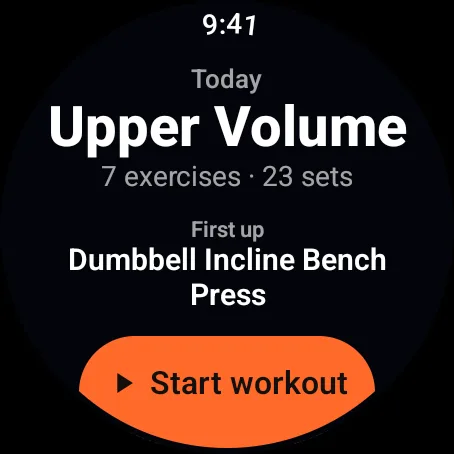
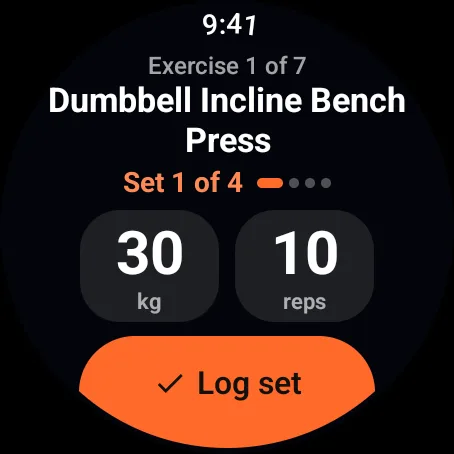
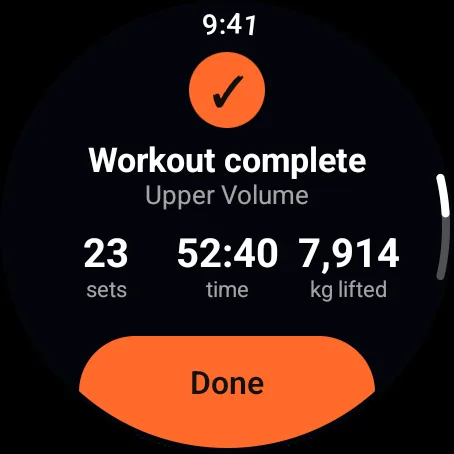
GymVim puts your training plan on your Wear OS watch. Start a workout, log each set with the weight and reps already filled in, and let the rest timer tell you when to go again, with a live heart rate the whole time.
What the watch does
- Your plan, day by dayPick a training day from the list and start it from the watch. Tap an exercise for its sets, muscles and how to do it.
- Sets in one tapWeight and reps come from your last session. Tap one to change it with the plus and minus buttons or the crown, then log.
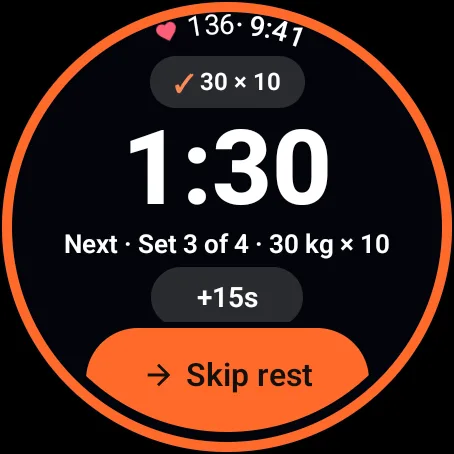
- Rest and timed holdsA rest ring around the screen, with Skip and +15s right on it, that buzzes when it's time to go again. Timed holds and cardio get a 3-2-1 lead-in.
- Live heart rateOn the watch, and on your phone's workout screen when the phone is with you.
- Keeps going with the screen offLower your wrist or open another app: the workout keeps running, and a shortcut on your watch face takes you back.
- kg or lbWeights show in the unit you use on your phone.
How it works with your phone
The Wear OS app comes with the GymVim app on your Android phone. Open a plan on the phone once and it's saved on the watch.
From then on the watch works on its own. Leave your phone in your bag or out of range, log the whole workout, and it syncs to your phone the next time they're connected.
Start on either device and the other follows: sets, rest and pauses stay in step on both screens.
Works with: Watches running Wear OS 3 or newer, paired with an Android phone that has the GymVim app.
Good to know
- Is the Wear OS app free?
- Yes. It comes with GymVim on Google Play, free and with no ads, and it stays free.
- Do I need my phone with me at the gym?
- No. Once your plan has synced, the watch runs the whole workout on its own and syncs it to your phone later.
- Will it work with my watch?
- If your watch runs Wear OS 3 or newer and is paired with an Android phone, yes.
- Can I start on my phone and finish on the watch?
- Yes. A workout started on either device shows on both, and a set logged on one appears on the other.